If you talk about social media success the first metric the majority of people will look to is the number of followers a business has. The more followers you have, the more popular you are right?
That may be so, but there’s no point having followers if they don’t engage with you in some way. Whether it’s clicking on your links, sharing your messages with their followers or answering your questions there are more ways than follower numbers to measure success.
Take a look at this infographic from Salesforce which shows alternative ways in which you can measure social media success.
Friday, 14 November 2014
15 Top Tools To Monitor Your Social Media Presence More Effectively
Social media has changed the world.
It’s a great way to keep in touch with friends, create new relationships, build communities and promote your blog/brand.
But when you’re using social specifically for marketing purposes; monitoring mentions, tracking your progress and gauging the impact that social is having on your blog or business are all important tasks that can be incredibly time consuming. The truth is that these tasks don’t have to be no where near as time consuming or difficult.
Fortunately there are plenty of tools available to save you time and help you get far better results through effective social media monitoring. In this post I’m going to show you some of the best tools. They range from free to paid and from basic to enterprise level tools so there’s something for everyone here.
Featured Download: Grab your free copy of my step-by-step checklist to grow your Twitter following the smart way (click to download).
Powerful tools to monitor your online presence more effectively
Below I’ve included tools that are purpose built for social listening and monitoring along with other social media tools that have reporting and monitoring built in.
Google Analytics
It isn’t enough to simply monitor the growth of your social presence or how many clicks your social messages are receiving.
You need to know which social networks are referring you traffic and out of that traffic, what is converting?
Whatever your conversion goals may be, you need to have conversion goals otherwise you won’t have a clue what’s working for you.
Aside from the general traffic and social activity, Google Analytics is particularly helpful because of:
Support for UTM parameters – this means you can use Google’s URL builder to add special tracking parameters which will allow you to collect more specific data.
Goal tracking – you can add your conversion goals (specifically landing page URL’s) and track how well each page converts. This will allow you to see which traffic sources convert best.
If you’re looking to track email sign ups using Google Analytics, this guide will help. Price: Free.
Cyfe
One of the main pain points involved in social media monitoring is the fact that there are so many tools that track different things in ways – keeping on top of them all can be a challenge.
This is where Cyfe comes in.
Cyfe allows you to create your own custom dashboard to track whatever you want.
There are pre-built widgets for social networks like Facebook, Linkedin, Twitter, Google+ and more.
Cyfe doesn’t just do social media, there are email marketing platforms, marketing platforms, SEO tools and plenty of others ways you can use this.
Once you add a widget within Cyfe, it will start tracking data from that point – you’ll have everything in one place. Price: Free for 5 widgets, you get unlimited everything for $19/month.
Oktopost
Oktopost is a great all-round social media tool that I’ve been testing out recently – I particularly like how your activity can be broken down into campaigns.
This makes it so much easier to monitor the progress of a campaign, rather than relying on bird’s eye view metrics or statistics for individual social messages.
Your social shares are also laid out across a very smart calendar so you can see what messages are going out for which campaign – all at a glance.
There are numerous other features but the reporting section is very well thought out. It’s super easy to see how well your campaigns are performing at a glance and which networks are driving results.
You can also see how many posts, clicks and conversions you’ve had for a particular period of time. Note: the image above shows 0 conversions because the lead capture feature wasn’t enabled on my trial account. Price: Starts from $9/month, upgrading ads additional features and increases social profile limits.
Mention
Mention has been designed specifically for monitoring the web for mentions.
You get access to plenty of statistics and you can easily export all of your data in various formats.
Monitoring is done in real time so you can pick up mentions across social networks, news sites, blogs and more.
If you work with a team, Mention gets even better because task management functionality is built in. Price: Starts from free for 250 mentions each month.
Sprout Social
Sprout Social is another great all round social media platform.
Whether you want to schedule social updates, respond to your followers, source content or co-ordinate a team of people – Sprout Social can help you.
The reporting and analytics features are impressive.
You can pull in statistics from Twitter, Facebook and easily use them to monitor, engagement, influence and growth.
If you’re working with a team, you can use the team report to see how effective your team is – you can see messages published and their task process. Price: Starts from $59/month.
NOD3x
If you want to do more in depth analysis of social media data – you will love NOD3x.
Its entry level plans are more focused on Youtube and Google+ which is actually a good thing because there aren’t too many tools you can use to gather data from these platforms.
There are plenty of great features that NOD3x will give you access too, but there are several that are particularly helpful for social media monitoring:
Brand monitoring and social listening
Sentiment analysis
Page insights (includes both profiles and brand pages)
Price: Starts from free, paid plains add support for social networks other than Youtube and Google+.
Brandwatch
Brandwatch is an enterprise level tool so is priced considerably higher than other tools on this list but it’s extremely powerful.
This tool will help you monitor conversations from all over the web, not just social networking sites.
You first start off by programming the tool with targeted queries (it supports Boolean search operators) and wait for the data to come back.
You get a lot of data at your fingertips with Brandwatch and to make it easier to manage there are numerous ways to visualise that data. You can also setup custom dashboards to see exactly what is going on.
One great way to use Brandwatch is to measure your “voice” against your competitors – this allows you to compare your online presence to your competitors and see exactly why they’re getting so many mentions. Price: Prices start at £500/month.
Twitter Analytics
Twitter now makes it extremely easy to monitor your progress with their analytics platform.
You can track the progress of your tweets, follower growth and use of Twitter Cards.
I particularly like the tweet activity view which will show you; impressions, engagement, link clicks, retweets and more.
Pinterest have a similar analytics tool which will help you monitor your progress more effectively. Price: Free.
Tweet Binder
If you want to get more data out of Twitter, Tweet Binder is incredible.
I was first introduced to it by Olga from SEMrush after I participated in one of their Twitter chats.
A quick search for the hashtag #SEMrushchat produced this smart looking report:
The report also lets you dive into who has contributed and can show you specific tweets.
You can also use Tweet Binder to give you reports on specific Twitter profiles. Price: Starts from free but data is only saved for 5 days.
Topsy
Topsy is a great little tool for checking up on social mentions.
It works best with Twitter as the platform has access to every tweet since Twitter first went live.
You can search for @username’s, keywords and domain names – you’ll then get a list of social mentions which you can dive into to find out who was sharing. You can also identify influencers although I’m not 100% on how they decide who is influential.
Topsy also has an analytics tool which you can use to track the mentions of specific @username’s, keywords and domains across a handy graph. Price: Starts from free.
Share Tally
This tool is so simple but so helpful at the same time.
Sometimes you may want to quickly find out where and how many times a URL has been shared.
Type a URL into Share Tally and you’ll instantly see how many shares it’s received over a lot of different social networks.
As well as the main social networking sites like Facebook, Google+ and Twitter etc, you’ll also find social bookmarking sites like BizSugar and Inbound.org. Price: Free.
BuzzSumo
I’m a big fan of BuzzSumo.
I use it for a variety of tasks including content analysis, influencer research and gathering content ideas.
Let’s say that you want to identify what content is getting shared heavily within your niche.
Open up BuzzSumo, type in a topic (also supports domains and other search operators) and hit search. You’ll then see all of the most shared content and you’ll be able to find out who is sharing that content too.
Pro users will get access to content analysis functionality which will enable you to dig deeper and see average shares by network, average shares by content type, total shares by date published and more. Price: Starts from free, pro accounts start at $99/month.
SumAll
SumAll is still in beta but it puts some very helpful data at your fingertips.
You can quickly integrate social platforms like Twitter, Facebook and Google+ as well as other platforms such as Vimeo, Google Analytics, Youtube, Tumblr, Moz, MailChimp and more.
Each platform will be added to your dashboard and you can then quickly see important info about your connected platforms.
You’ll also get daily or weekly email digests so you can see how things are going on the go. Price: Starts from free.
Buffer
Buffer is best known for being an incredible scheduling tool and a brand that cares (their support is awesome).
They do have some very helpful analytical features.
Admittedly, the best features are available on their business plan, but regular accounts will give you a helpful overview of how successful your social messages have been in terms of clicks and reach. Price: Starts from free, connect more accounts and unlock RSS feeds for $10/month.
HootSuite
HootSuite has been my go-to social management tool for a very long time.
And while I don’t usually use it for anything other than that, it actually has some helpful reporting features that you may find useful.
Free plans get access to basic analytics but you can still get some helpful data from it.
Reports include:
Twitter profile overview
Facebook page overview
Click summaries
All of the above reports are free.
Paid reports include the following (and more):
Linkedin page insights
Facebook insights
Twitter Engagement (detailed/summary)
Google Analytics
Price: Starts from free, pro account costs $8.99/month which upgrades limits and adds extra features including better analytics.
6 Mind-Blowing Tips to Optimize Your Social Media Marketing
Which social media strategies actually work? Are there any best practices that can help you make the most of the time and money you spend on social media? What do other marketers do to optimize their social media efforts? Adobe and Software Advice teamed up to answer these very questions in their Social Media Content Optimization survey. They surveyed 182 marketers to see which strategies marketers are currently using to optimize their social media marketing.
The following 6 tips are best practices you can use to effectively optimize your social media marketing!
1. Use hashtags.
67% of respondents said they found hashtags important or very important in their marketing mix.
Hashtags can not only help you find new people to reach, they can give people a way to find YOU.
Some tips for using hashtags in your marketing include:
Figure out which hashtags influencers in your niche are using
Find trending hashtags in your niche
Look for conversations happening around your brand or niche
Create your own hashtags to create buzz around a contest, promotion or marketing campaign
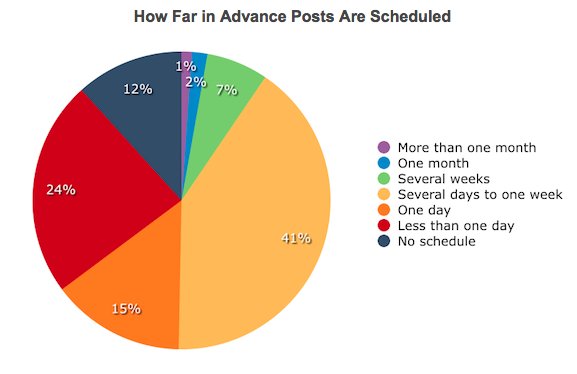
41% of respondents said they schedule their social media posts several days to one week in advance, while a total of 65% say they schedule their content at least 1 day in advance.
Scheduling your posts gives you a cushion in case of unforeseen circumstances, and ensures you don’t forget to post regularly. Consistency is key to social media marketing success, and scheduling is the best way to make sure you maintain it.
3. Use images.
You have heard me emphasize the importance of using images before, but I cannot stress it enough:
Images are one of the best tools we have for increasing engagement on social media.
Respondents reported images as being the #1 most crucial element in their social media marketing; 82% of marketers said images were important or very important.
Watch your analytics carefully to see which types of images your audience prefers: Humorous? Motivational? Inspirational? Infographics? Then make sure to post these more often in order to increase engagement.
To see some FREE tools you can use to create your own images, check out my post 6 Free tools to Create Eye Catching Graphics.
4. Post 1-3 times per day minimum.
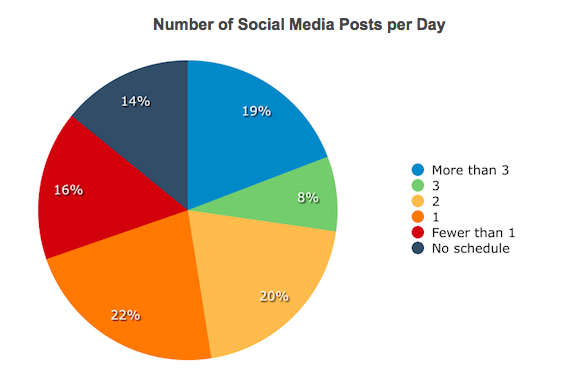
70% of marketers surveyed said they posted on social media at least once per day, with 19% saying they posted 3x per day. For business owners looking to build their brand and grow their social media presence, I always recommend posting at least 3x per day.
It is all about finding the optimal balance between posting too little and too much: I encourage you to try posting at different frequencies (1x per day, 3x per day, 5x per day, etc.) to see how often your fans and followers want to hear from you.
5. Be active on at least 3-4 social networking sites.
According to the survey, most marketers (84%) are active on at least 3 social networks, while 61% are active on at least 4 networks. This means that if you want to remain competitive, you may want to consider adding a network or two to your marketing mix.
Facebook and Twitter are generally a good idea for all business owners.
To figure out which other sites you should be using, consider the following:
Are you targeting educated professionals? Check out LinkedIn.
Is your business in the fashion, cooking, home décor or retail niches? Consider Pinterest.
Are ‘techy types’ interested in what you have to offer? Google+ is a must.
6. Use trial and error to determine optimal posting times.
There are many stats floating around that claim to give the optimal times to post to social media. And while these can be helpful as a starting point, your best bet is to try various times to see which ones work best for your audience.
87% of marketers stated that it was at least moderately important to test shares and click through rates at different times to determine the best days and times to post.
As always, keep in mind that while these may be best practices, they may not all be ‘best’ for you! Continue testing and tweaking until you find the most effective strategies for your audience!
Social media can be confusing.
Keeping up with the multiple social channels; posting original content and coming up with a social media plan that generates leads, engagement, revenue or some other tangible goal can make you feel like pulling out your hair.
However, studies show that social media marketing works. In 2014, investment in social media is a necessity, and no longer a luxury.
According to Social Media Examiner, companies using social media for 3 or 4 years see an improvement in their search rankings too.
Social media is not just a trend that’s going to pass – and marketers are taking note of it. Since there’s no ignoring social media, here are some tips on how you can make it painfree and easy (even if you hate it).
Choose your social media platforms
You don’t have to be active on all social platforms out there. There, I said it. You can breathe now.
In fact, be very aware of what accounts you monitor and focus on.
Don’t spread yourself too thin. As a rule of thumb, if you’re starting out, have your presence on the “Big 4” sites:
Facebook
Twitter
Google+
LinkedIn
You should consider Pinterest and Instagram depending on your target audience. Once these are out of the way, you may then consider the more focused community-based platforms such as Tumblr, StumbleUpon and the likes.
Everything else? Only focus on them once you’ve crossed the bare-minimums off your list. So when your photographer friend comes raving about a new social platform, stop and ask some smart questions before jumping in and creating another “free” (and soon-to-be-dormant) account.
It could be that a platform works well for them because it attracts a strong community of people interested in photography and related services.
But for you? It’s plain distraction. Choose and invest your time wisely.
Be intentional about social media
Many small business owners focus on the immediate number of followers or shares. Only about one in three marketers agree that they are able to measure their social activities ROI.
What is your goal from those followers? Is it brand awareness, leads or loyalty? If most of the 25,466 followers on your Twitter are disengaged, does that do any good to your ROI?
In short, get clear about your end-goal from social media.
Make posting a part of your morning routine to schedule posts for social media. For example, if you’re a retailer, you can have a daily post about “Featured and discounted item of the day” with visuals.
Have “themed days” so your audience gets used to expecting a certain type of content from you depending on the weekday. When your intention is clearly laid out, it’s super-easy to come up with content and you gradually build a habit to post everyday.
You can spend as little as 6 hours/week on social media and still generate leads off it.
According to Social Media Examiner’s 2014 Social Media Marketing Industry Report, more than 64% of marketers are doing just that. Out of those, more than 84% saw an increase in their traffic from the invested hours of effort.
Here are 6 social media marketing tools to make your management pain free, quick and easy.
1. Outsource
Sometimes you just don’t have the time, inclination or energy to manage several social accounts.
In an ideal world, you want an inhouse person or team to take charge of your social media. But hiring a dedicated staff as a small business can be expensive.
For small businesses, outsourcing is a brilliant midway that doesn’t cost much and let’s you dedicate a resource for your social media tasks. Done-for-you service $99 Social can help you save time and money.
At $99/mo, you get a dedicated account manager who posts individualized content 7 days a week to your pages.
If you’re the DIY type, here are more tools that will help.
2. Scheduling
You can use popular tools like IFTTT and Buffer for scheduling purposes. But what if you’re posting great content all at wrong times?
Small businesses can be smart by analyzing the best times to post with Tweriod.
Go to Tweriod and sign in with your Twitter account. Tweriod will work out a report based on your followers. Once the report is ready, they share it via DM. The free version can analyze upto 1000 followers.
3. Management
You’ve already heard about tools such as Hootsuite and Sendible. These work well for small and mid-sized businesses.
If you are a B2B marketer with a lot of content to distribute, Oktopost makes social media management easy across your many profiles, groups and company pages. It can also monitor LinkedIn company pages and groups. Oktopost focuses on tracking to determine which channels bring the most ROI.
The tool integrates with Marketo and Salesforce also.
You can start your 30-day free trial and choose from plans as less as $9/mo to $249/mo for multiple users.
4. Content curation
Swayy tells you what to share with your audience on Facebook, Twitter and LinkedIn.
Once you share a suggested piece of content, you can view analytics inside the app (retweets, mentions, favorites, followers, shares links clicked etc).
You can start with $0/mo for one dashboard.
5. Visual content
Social has evolved into visual social. Twitter recently allowed larger header images following Facebook’s successful move to Timeline in 2011 that brought a whopping 65% increase in engagement for Facebook.
According to a study conducted by the folks at Buffer, images can increase retweet rate by 150%.
Compfight is a free Flickr search tool that makes image sourcing a breeze. It pulls all photos under Creative Commons for Commercial use license.
You can do a quick search for emotions, objects, concepts and pick an image that best represents your content. Compfight also provides you with an HTML attribution code to give attribution to the owner.
Search results for “smile”
6. Online reputation
Topsy is a neat little social search engine to keep a tab on what’s being said about you or your brand online. Just punch in the keyword (or your name, industry, competitor) and Topsy will search links, tweets, photos videos, and any influencers who mentioned you.
You can sort the search results by relevance, oldest or newest.
Here’s a search result on my name:
Read more at http://www.jeffbullas.com/2014/11/04/6-social-media-marketing-tools-to-make-your-management-quick-and-easy/#MziZftMUkjJFS7lJ.99
If you consider yourself a know-it-all social media guru, you're in for a surprise. Following the rapid evolution of social media analytics tools, industry experts are able to extract lots of new and increasingly detailed information that helps marketers to create more effective social media strategies. There are dozens of research studies being conducted on the subject, some of which you might not even now existed. Here are ten interesting social media facts you probably didn’t know about.
1. That's right, Facebook is growing
Even though to some markets Facebook is slowly becoming an obsolete social media platform, the global scale shows something completely different. It's hard to imagine, but it's true – every second 5 new Facebook profiles are created. That's more than the number of global births!
2. Twitter has 6 different communication networks
A recent study conducted by the Pew Research Center jointly with the Social Media Research Foundation, analyzed thousands of Twitter conversations and spotted a pattern. There are as many as 6 completely different communication networks at work on Twitter. And we all thought tweeting was such a simple affair.
3. Users love videos more than ever
Even though marketers agree that original videos aren't exactly an important part of their social media strategy (have a look at this survey), facts speak for themselves. Every day, Facebook users watch more than 500 years worth of videos and an average visitor spends at least 15 minutes on YouTube.
4. Twitter is a real-time dictator
A research study by Lithium Technologies showed that the real-time nature of Twitter can result in some really high expectations from users – apparently, 53% of those who tweet a brand expect an answer within an hour. But that's not all. If they're angry and their tweet is a complaint, the number rises to a smashing 72%! Use tools to track your response time and make sure to respond as fast as possible to all tweets that make your way (especially the angry ones!).
5. Facebook is most alive on Fridays
In its recent Social Intelligence Report, Adobe analyzes over 225 billion Facebook posts and concludes that the best time to count on user engagement is Friday. That's when posts receive more comments, shares and likes – perhaps because Fridays are perfect days for slacking off at work! Something to consider when you're reviewing your own posting schedule.
6. Late evening is a perfect time to tweet
After analyzing over 1.7 million tweets, TrackMaven came up with a precise timing for maximizing our chances at getting retweeted. Apparently, the best time to tweet during the day is from 10 p.m. to 11 p.m. ET, best done on Sunday. Late night is a moment when the share volume is lower and content simply has a greater chance at being shared. If you're looking for more engagement, consider posting during this hour.
7. Every day has its winner on Pinterest
Pinterest is one of the social media platforms that drives most web traffic, so it's only natural that the team seizes their immense amount of data and granted us some really valuable insights. Pinterest revealed on their company blog the top categories that get most engagement every day of the week. While fitness posts will score high on Monday, those with inspirational quotes are most popular on Wednesday (it figures – workers like to be comforted half-way through their working week).
8. Visuals have real power on Facebook
We all know the value of great images for our social media marketing, but this figure is simply mind-blowing. Social Bakers revealed that 87% of all interactions of a Facebook page happen on photo posts. In comparison, posts with links receive only 4% of all interactions. Choosing photos that fit your brand narrative or tell a story on their own should now become your priority.
9. Written content is key
The expected rise of content marketing means that more and more marketers will be on the lookout for high-quality content to raise their brand awareness across various social media platforms. Writers can feel secure – it seems that written content is what marketers appreciate most. An annual survey conducted by the Social Media Examiner revealed that 58% of marketers considered blog posts and expert articles as the most important kind of social content. That's really impressive, especially when considered next to the meek 19% of marketers who voted for visual content.
10. The 55-64 age bracket is growing on Twitter
And growing fast. In fact, this is the fastest growing demographic on Twitter! This surprising fact will bring joy to all those who market products for mature consumers.
Judging by the practical insights brought by data derived from all those research studies, one thing is clear – in order to stay on top of your game, you simply must have a firm grasp over social media analytics and statistics.
Confused by Hashtags. 5 Expert Tips for Marketing with Hashtags
When hashtags first emerged they were seen as only for geeks. The rumblings and rumours suggested that they would never catch on. But they did. Twitter was the first social network that adopted this strange habit in 2007.
Today the hashtag is used almost everywhere. They are even now appearing on TV, billboards and on the backs of buses!
But identifying the right hashtag is complex when it comes to social engagement and monitoring. It allows us to search conversations where our target customers mostly hang out. When you want to reach a large audience by launching a visual social campaign, then you can use hashtags. It seems like a pound symbol (#), but it is a powerful way to improve your reach to your target audience across different social media platforms.
Facebook was a slow adopter
It took some time for the social media giant Facebook to give in to the hashtag trend and it was dragged kicking and screaming into the hashtag fray in June 2013. But now this little symbol connects conversations on Twitter, Tumblr, Facebook, Instagram, Pinterest, Flickr, YouTube, and Google+.
Here is the figure displaying the name of the social media networks that allows the use of hashtags for improving conversations with the target audiences:
The caption represented using the hashtag might contain any number of descriptive words, but words with hashtags specifically refer to the overall theme of the post. For example, if you want to share your picture of riding a bicycle in CP, New Delhi, you can share this picture using the hashtag and adding a little description like this:
“#Me on my #bicycle in #CP, New Delhi”
Using hashtags in front of words for explaining the picture helps in drawing the attention of the audiences towards you and your bicycle.
Important tactics for using hashtags in content
Using hashtags efficiently in social media content is a bit confusing for many social media marketers. You need to know the important tactics required for using these little symbols successfully.
Hashtags offer a vital link between digital marketing and communication.
Therefore, if you are aware of the strategies required for successfully using hashtags in your social media content, you can establish long term relationships with your target audience. This long term approach will eventually bring remarkable outcomes.
1. Categorize your brand’s messages using hashtags
Hashtags have launched a new way of defining and categorizing topics of conversation over social media sites so that the audience can track down the posts related to an event or a group they were interested in. Hence, they are ideal for classifying the content, whether the posts are related to an imminent conference of your business or the products or services offered by your company.
When you upload the social media content, you can use the hashtags for describing its purpose and for adding value to what it is going to offer to the audience. Delineating posts using the hashtags help in promoting your business brand content.
Here is an example of Dairy Queen, which has labeled its Tumblr page posts using tags like #DairyQueens and #LoveMyDQ and it has also used the hashtags with its menu item flavors such as #chocolate, #Pumpkinpie, and #Cake for defining its branding pictures, animated graphics, videos in a better way. It will help its consumers find their social media content easily.
2. Expand your content reach
Hashtag not only helps in categorizing and describing your social media content, but it also helps in expanding the reach of your brand on a wider spectrum. By employing popular hashtags, which are commonly searched by the audience, you will significantly improve the visibility and sharing of your content.
Here is an example of Burt’s Bee, which has successfully attracted the attention of its audience to its latest #6SecondClassics branded videos by tweeting the clips with specific hashtags related to this campaign.
The popular hashtag used by this brand is #classic, which has helped Burt’s bee in expanding their reach among their audience.
Another example is Ford Fiesta, which has implemented the same strategy on Instagram. It has successfully complemented #FiestaMovement tag used for its cross country pictures of Ford Fiesta with famous hashtags like #Florida, #travel, and #malibu.
3. Start a topic trend with hashtags
While most of the popular hashtags used by you in your social media content help in increasing its visibility among the audience, they can also give you an opportunity to display your brand’s creativity. You can use the popular hashtags for defining your brand’s pictures over social media sites. One such example is Ben & Jerry, who have wisely adopted the “SharkWeek” hashtags of Discovery Channel in an attempt to capitalize the attention of the audience created by this weeklong TV program. Famous hashtags such as #SharkAfterDar, #Megalodon, and # SharkWeek were used for attracting the attention towards the shark themed posts of Ben & Jerry.
You can see that one of its branded picture feature a bucket full of Phish Food ice cream next to a fishing pole.
You can also invent the hashtags to promote your brand in a conventional way as this strategy has been successful for brands like MTV, which has modified the tag, #FollowMeMTV as #FollowMeFriday. It is a Twitter custom feature that allows other users to follow on the site.
4. Use the hashtags sparingly and wisely
It might sound counterintuitive, but it is important to use the hashtags sparingly and wisely to ensure good conversation settlement with your target audience. If you use too many hashtags in a single social media content post, your message will read like spam, which might deviate the social media content readers. There are different theories available over the internet related to the use of hashtags in a post, but it is considered safe to use one to three hashtags in a single post.
5. Choose simple hashtags
While choosing a hashtag for your social media content, it is important to ensure that your hashtags are easy to remember. Hashtags should be short and easy to spell or pronounce. It must exhibit the brief idea about the key topic of conversation.
While choosing your hashtag, you must consider your objectives, which is having your target audience come together for the conversation and also to ensure that it is easy to understand and remember.
Dancing with the Stars, is a perfect example, as it has used a short and simple hashtag, #DWTS for organizing people’s conversations about their show and engage with their consumers.
When you employ hashtags in your social media strategy, the solution is to ensure you are utilizing the right hashtags at the right place to make sure you are reaching your target audience in an optimistic way. If you follow these five steps wisely while executing your hashtag strategy wih your social media content, you’ll be able to select a hashtag that is not only outstanding and unique but will bring your audience with you.
Keep in mind that it is acceptable to use universal hashtags such as #marketing or #webinars. Use various hashtags if the topic is right, but do not confuse by including too many hashtags.
Using hashtags could be fruitless for the brands if done inaccurately. So how your brand can utilize the power of hashtags depends on how effectively you have created hashtags while adhering to the five key social media content strategy discussed above.
There is a big increase in the number of brands realizing the real value of using hashtags but getting creative while choosing hashtags for your brand will yield better results.
Read more at http://www.jeffbullas.com/2014/10/23/confused-by-hashtags-5-expert-tips-for-marketing-with-hashtags/#PlgTPoauZhMIvjKl.99
Tuesday, 21 October 2014
10 Ways To Create Contagious Content for Your Social Media Marketing
Do you want to create posts that people can’t but share?
Do want to maximize the social media ROI for your posts and stand out among the sea of content being churned out every day?
Creating shareable content boils down to understanding the mind of your audience. You can then understand exactly what makes them tick…or not.
What elements cause them to share?
The better understanding you have of the mind of your audience, the more effectively you’ll be able to create shareable content.
It’s important to remember that there is still a person behind that computer. Understand how they think, and you can fine-tune your content so that it gets shared more frequently.
In this article, you’ll learn the science behind what makes people share. You’ll discover 10 ways to create content that your fans can’t wait to discuss and share.
I have also included advanced tactics as a bonus, so be sure to read all the way to the end to get your copy.
First, let’s examine why people share content.
The psychology of why people share
The NY Times Insights Group published a study that highlighted the key factors that cause people to share content. Sharing, according to the study, is closely tied to our relationships with others. The study outlined the following key motivations for people to share:
To define ourselves to others
To bring valuable and entertaining content to others
To grow and nourish relationships
To get the word out about causes and brands we care about.
Another study involving the NY Times found that creating emotive content could lead to increased sharing. Content is more likely to be shared if it is funny, moving, illuminating, inspiring, shocking, cute, controversial or sexy, or if it leaves the user feeling fearful or in awe. The Journal of Science published a study on the psychology of sharing in 2011 which supported the above study on emotions by saying:
“The sharing of stories or information may be driven in part by arousal. When people are physiologically aroused, whether due to emotional stimuli or otherwise, the autonomic nervous is activated, which then boosts social transmission.”
What do the studies mean for those looking to create shareable content?
Simply this – stories are an effective way of conveying emotive content.
The studies also mean that there is a science to creating shareable content. No, it’s not an exact science, but, by following certain guidelines, you dramatically increase your chances of getting your content shared by playing to the wants, needs and psychology of your audience.
Social media is often used to point to longer form content, which can include stories; however, a story in this context could be a photo, vine or video clip.
Here are 6 guidelines to help increase the chances of your content being shared.
Appeal to your audience’s motivation to connect with each other (not just with your brand).
Tell a story.
Credibility needs to be established, as does trust, which is the cost of getting shares.
Keep the message simple.
Appeal to positive emotions like inspiration, illumination or amusement to build a positive brand connection.
Embed a sense of urgency.
Here are 10 ways to create contagious content.
1. Leverage social validation
We all have a strong desire for approval. The Power of Likes study found that social media users were more likely to up-vote a pre-liked comment.
Author Robert Cialdini conducted a study in which researchers participating in door-to-door charity campaigns found that people were more likely to donate when the list of prior donors was longer. In addition, when the list included people that the prospect knew – such as friends and neighbours – they were even more likely to donate.
How to do it online
Social Media Examiner has sharing buttons with share counts clearly visible in a vertical floating bar for each of their posts.
Conversion Rate Experts helped South American flower delivery company daFlores nearly double their revenue.
They discovered that some visitors to the website had never heard of the company before. So, they replaced the rotating banner with a static image that read “¡GRACIAS a nuestros mas de 600,000 seguidores en Facebook!” (“Thanks to our 600,000+ Facebook fans.”).
The result was a 44% increase in sales simply by adding social media proof of the firm’s popularity.
2. Use good news
Consider the following studies:
Author Jonah Berger examined around 7,000 New York Times articles which had been shared, and found that positive news was more likely to go viral.
A study by BuzzSumo also found that the most common emotions invoked by articles that were shared were awe, laughter and amusement.
A study by Ipsos showed that 61% of people shared interesting things, 43% of people shared funny things and 29% of people shared unique content.
How to do it online
Buzzfeed and Upworthy are masters at creating reactive content. Content that triggers positive high arousal emotions, along with headlines that evoke curiosity and awe, is more likely to be shared.
According to Jakob Nielsen, 16% of users read web copy word for word, while 79% read by scanning a page and picking out individual words and sentences.
Design and look matter even when it comes to written content. Organizing content in a way that is easily scannable and has a clear eye path will increase engagement.
Using subheaders, breaking up blocks of text, and picking an easily readable font will all help readers engage with your content.
How to do it online
Apple are masters of delivering pleasing aesthetics on the web, as well as in their print ads. Here are a few guidelines they follow:
Use a headline with a large font to highlight one big idea.
Use sub-headlines before each paragraph, or at the very least after 2-3 paragraphs, to keep scanners curious and engaged.
Use the inverted pyramid structure in writing your content. Essentially, this structure entails starting with your most important point and then following on with less important points. The least important points come last. This way, those who scan the content will be able to pick up on the key points quickly.
Use bullet points that fascinate and intrigue your audience
4. React fast
Oreo’s tweet and Facebook post during the Super Bowl blackout generated a huge amount of buzz, mainly because they were subtle and timely. They reacted to an unexpected event and, in doing so, created a powerful ad on the most expensive advertising day of the year.
How to do it online
Being able to react to the moment is now possible for even the smallest businesses, thanks to smartphones and their cameras. Share breaking news, experiences or exchanges to engage your audience.
If you know there is a conference going on that is closely aligned to your business, and you know what the hashtag for the conference is, you could leverage that by sending out relevant tweets incorporating the hashtag.
5. Load it with emotional appeal
In his book Descartes Error, Antonio Damasio, a professor of neuroscience at the University of Southern California, explains that emotion is a necessary ingredient in almost all decisions. This has been backed by a study conducted by researchers Raj Ragunathan and Szu-Chi Huang at the University of Texas in Austin.
How to do it online
People are more likely to share content that creates a visceral response. How do you know whether your content has visceral response?
Do a “gut check” to ensure the content is on the right track.
Did it make you LOL?
Did you feel that you were going to embarrass yourself in front of your co-workers with tears?
The chances are that if you don’t feel it, others won’t either.
A deciding factor by Upworthy staff writer Adam Mordechai in publishing a documentary about the late Zach Sobiech was the fact he cried while watching it the first time, and then cried again the second time he watched it.
6. Use a great story
Many of our buy decisions are based on emotional drivers, and not the rational benefits or features of the product. Great stories tend to be emotional, and not just dramatic.
For example, the Dutch funeral insurance company, Dela, created a deeply emotional story around their product. They asked people to share what they would tell a loved one before they died. The stories are touching and moving; so much so, we want to pass them on and reach out to our own parents, friends or relatives to tell them how important they are to us.
Great stories can even take the form of the written word. Jon Morrow wrote an article titled On Dying Mothers and Fighting for Your Ideas which resonated with Copyblogger’s large audience, inspiring them in their content marketing efforts.
How to do it online
So, how do you write stories that build emotional connections?
Here are a few tips:
Show, don’t tell. In other words, show the audience what is happening in the story rather than telling them. Use descriptive words that evoke deeper feelings for the characters and their circumstances.
Create characters people relate to and care about. Use your audience buyer personas as characters to drive an even deeper relationship with your business. When your audience can relate to your characters, they will organically begin connecting emotionally.
Your story isn’t a standalone story. The story should be part of a broader long-term story arc. The obstacles that your characters need to get past should be ones that your audience can identify with, motivating them to root for your characters. Standalone stories lose out on the potential to build long-term relationships. Leave your audience hanging with the promise of more, just like the best tv fiction series do at the end of each episode.
Stay true to your brand promise. Red Bull, for example, has a brand image of adventure, extreme sports and freedom. The company’s stories provide consistency as they focus on a variety of characters, each living the Red Bull lifestyle.
7. Leverage controversy
If some people hate it and others love it, it’s more likely to get shared. A paper by Zoey Chen and Jonah Berger in the October, 2013 edition of the Journal of Consumer Research examined the way controversial topics affect people’s willingness to talk about them. The study found that content on moderately controversial topics had, on average, more comments than content on highly controversial topics.
Moderately controversial topics tend to evoke just enough anger to have an impact, which is the most effective emotive trigger for creating viral content.
How to do it online
The internet hoax Bonsai Kitten is an example. People loved or hated the thought that it was animal cruelty.
Derek Halpern used this trigger in an article titled – The “Content is King” Myth Debunked. In it, he suggested that design is king, and not content. This created controversy and generated a fair amount of discussion among content marketers who were used to the “Content is King” conversation, and among web designers who felt their own work was being validated in the post. The post worked because it was something that people did not expect. It therefore engaged their attention, encouraging them to keep reading, commenting and sharing the article with others. It worked well for Derek in terms of getting both attention and readers.
8. Make your audience look smart and classy.
According to research, people are 25% more likely to buy a product they would be proud to own, and 25% less likely to buy if a social media sharing button is placed anywhere near the product.
How to do it online
Poo-Pourii handles a delicate subject tactfully with their video and social media posts
Some people focus their social media sharing on professional or business-centered pursuits. In this space, you can engage your audience by bringing thought leadership into your area. Studies, infographics, research, statistics, and actionable content that provides some practical value, can be a focus of content that you share.
If you provide a significant benefit to this group, they are likely to share it with others. Here is an example of a tweet sharing a post and infographic on Jeff Bullas’ blog.
9. Be a part of something bigger.
In a survey by the NY Times, 68% of people said they shared to give people a better sense of who they are and what they care about.
Non-profit and philanthropic organisations in particular can benefit from this kind of sharing, as can any business that supports a cause. Those who share in order to support causes or issues are already motivated, and only need a slight incentive to pass along related content.
For example, Surf Dog Richochet posted this dog photo on Facebook. Pet Supplies Company Iams had agreed to donate 50 bowls of pet food for shelter animals for every comment on the photo, up to 1 million bowls. They reached the 1 million bowls mark in 24 hours and still the comments kept coming.
Share causes and concerns that relate to your business values, and engage your community and audience through campaigns like the one above.
10. Juicy gossip
Why do people gossip? Usually, it’s because the information is simply too good not to share. The most appealing gossip tends to be both surprising and interesting. Such content gets shared because it pulls a little from humor, a little from emotion, and a little from the self-definition categories.
How to do it online
HelloFlo, a tampon subscription service, touched upon an often delicate subject for women with their Camp Gyno ad, which tackles the subject with honesty, humor and heart. The ad turned into a viral hit, attracting close to 6 million views in its first month online.
While it is hard to define such content, most people know it when they see it. So keep an eye out for cool, unique stuff being shared. Make a note of common themes and executions to help you create your own zeitgeist.
Creating contagious content
There are many ways to create socially shareable contagious content, and your analytics and graph search will help you with preliminary research with regard to what your audience is interested in.
As you try out one or more of the ways of creating shareable content, be sure to measure your engagement rate in order to provide insights into how people talk about your post. This will allow you to see what is, and what isn’t, working, and to continue to improve the quality of your content
However, make sure you are spending as much time getting your content out in front of your audience and influencers as you do actually creating it. Be sure to get your 5 advanced tactics as well.
Read more at http://www.jeffbullas.com/2014/10/21/10-ways-to-create-contagious-content-for-your-social-media-marketing/#i5USlgejPpYVUJVZ.99
4 Killer Ways To Launch a Product With Social Media
Before social media, product launches were high-budget events that would take weeks and sometimes months to pull off.
With 1.2 billion active users or one in four people using social media, building anticipation for your product and successfully launching it does not have to cost you much in terms of advertising, content creation and distribution.
Without a doubt, your product launch will have the greatest reach and impact if you already have a solid social media fan base. You will be tapping into this audience to spread the word about the product and for them to undertake a significant conversion event such as purchasing the product, signing up for membership, making a pre-order etc.
Here are 4 creative ways to use social media for a successful product launch:
Get personal and draw attention with video
You have seen the numbers: Over 68% of online consumers spend most of their time watching videos. There is something compelling and extremely engaging about watching content than reading it.
Creating a single video or a video series builds trust and creates a personal connection between you and your product and your target audience.
What type of content would be suitable for your product launch? This really depends on the nature of your product. For example, if you are launching a book, you may need to create a video where you are reading sections of the book. If you are launching a clothing line, you may need a series of videos that showcase models showing off a taste of what is to come.
A great way to build that personal connection with your social media fans is to create a personal video where you briefly speak to them about the project you are working on.
Extend the reach of your videos by sharing them across other social media platforms other than YouTube and Instagram. Facebook, Twitter and Google Plus audiences are particularly receptive to video content.
Create excitement and engagement with contests
Social media contests are incredibly effective in engaging your audience, creating brand awareness and building loyalty. Prior to launching your product, you need to first engage your audience to make them feel that they are involved in the launch process even if they do not know what’s behind the scenes. A contest can give your audience a hint of what is about to come without revealing too much information.
For example, if you were launching a fall clothing line, you would set up a contest for the best-dressed fan and allow other fans to vote for their favorite contestants.
Facebook and Twitter users are usually very receptive to fun contests that offer value at the end of it all.
Leverage the power of brand advocates
Prior to launching, you want as many people to know about the project you are working on and the resultant product.
Not all your social media fans will be suitable brand advocates; you want to target just a small group of people who are interested in your project and will be excited to spread the word.
Set up a way for your brand advocates to get in touch with you so they can access exclusive information about the product and the launch. For example, you can build a Facebook landing page with content that is excusive to the group of advocates or create a Facebook group only for those who are more interested in the product and are happy to create buzz for it.
Synchronize your social media activity with a hashtag
A hashtag does a great job of rounding up your brand and the activities around your brand.
Its uniqueness to your brand and product means that your audience can easily identify it and use it to share content across different social media platforms.
What is really great about a hashtag that is unique to your brand is that it starts and facilitates a conversation around your product and the launch. Starting conversations is undoubtedly an all-important aspect of social media marketing.
Creating a hashtag is also a great way of boosting user-generated content created by your fans across different social media platforms.
Social Media Product Launches
With great content and a solid fan base, you can effectively build anticipation for your product launch without breaking the bank, so to speak. Leverage all the social networks where you have already built a following to maximize the reach and impact of the launch.


 Social media has changed the world.