ONLINE SUCCESS

Monday, 1 September 2014


Learn How to Use Google Plus | A Beginner’s Guide
 
googleplusIt’s time. You must pay attention to Google + if you are at all on social media or in the blogging world. I know learning something new is hard. I know Google + isn’t intuitive. Still…we must soldier on.
*At the bottom of this post, I’ve included a video tutorial for people who want/need visual help getting into Google plus! Please check it out!*
So many people don’t get Google + and I’ll admit, I was one of them. But I also said the same thing about Twitter for 4 years! And I finally got it. And I learned that if I stick with it, I’ll get it. And I have to say, Google + is now my favorite “go-to” social platform. So here’s what I’ve learned so far, and what I think is important for beginners to understand.
I’m going to start by drawing some parallels between Facebook and Google +. If you know Facebook, you’ll see the similarities.

The Newsfeed

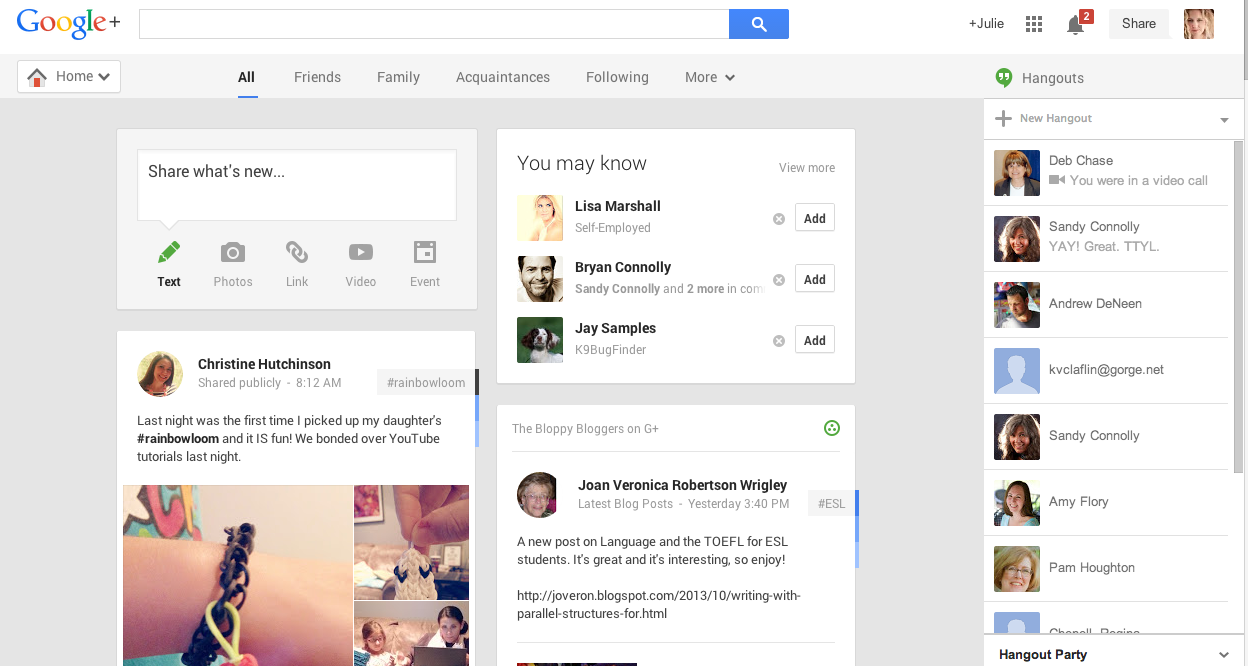
This is what the Google + newsfeed looks like…
Google + newsfeed
On the top left hand side, you’ll see a home button. Hover over that and you’ll be able to access your profile, explore new topics, follow events, upload photos, join communities (which is just like Facebook groups), find new people to connect with, and the more tab is where you can find local stuff, games and apps, hangouts (which is like Skype), and pages. When you get lost, go back to that button. Sometimes the tabs move around depending on how frequently you use them. Google + pages works a lot like the Facebook pages. More on that later.
Quick snapshot of the menu bar on the left
  • HOME = Your newsfeed (i.e. what people are posting)
  • PROFILE = Your landing page (what people see when they are coming to check you out)
  • PEOPLE = Where you can see people that are on G+ to follow as well as those who follow you
  • PHOTOS = All the photos you’ve uploaded (either through your phone or into status updates)
  • COMMUNITIES = Just like groups on Facebook, these are like “mini-google +’s” where you gather to chat with people about a specific topic.
  • EVENTS = Events can be live video hangouts, actual events, or online events (like Twitter parties). These events sync up with your Google calendar.
  • HANGOUTS = These are live video on-air broadcasts or private video hangouts. More later.
  • PAGES = If you have a business or a brand, you can create a page and access it from here. It is also where you can find other pages to connect and follow.
  • LOCAL = This is connected to your location and shows you relevant businesses that you can check out and/or review.
  • SETTINGS = Where you manage your notifications, privacy, circles, etc.

Understanding Circles (aka people)

Circles are where your friends go. In the main menu area, it’s called PEOPLE. Now in Facebook, you can create custom lists, but you accept a friend – and it just goes into the big pool of friends. Circles are an easy way to interact with different people from work, the community, or online. You can create as many circles as you’d like. People can be in one circle or many.
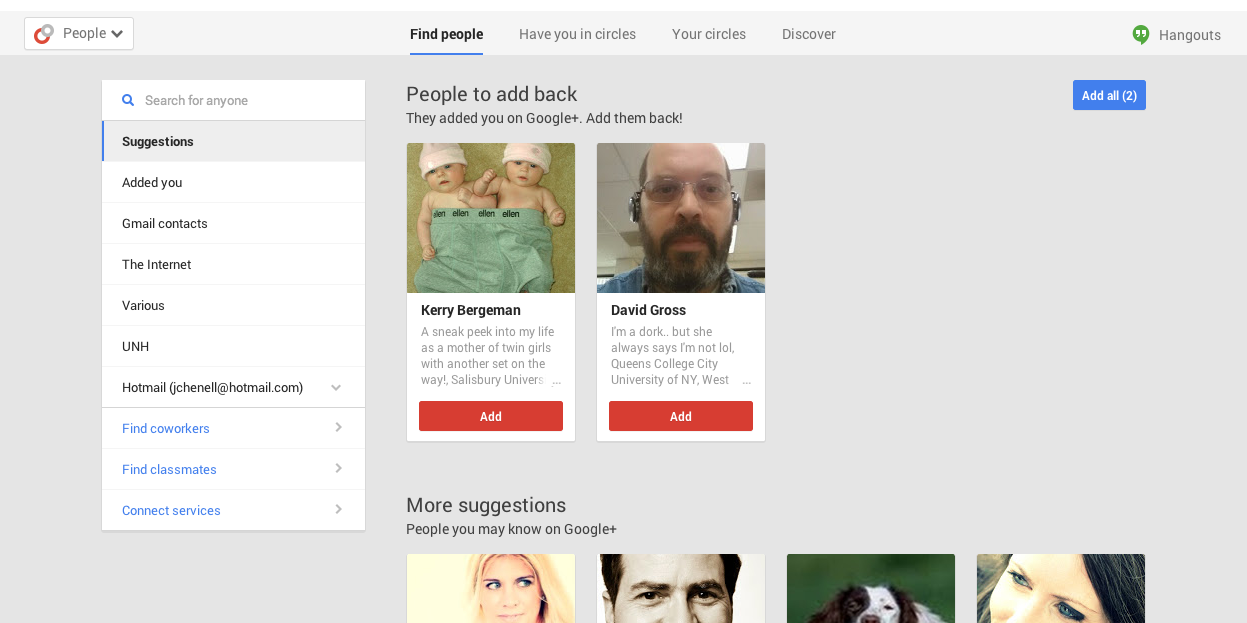
G+ will help you find people, or you can just search.
  1. If you click on the find people button, it will pull up suggestions for you.
  2. When you find someone you recognize, hover over their name. A menu will pop up and you can check off what circle you want to add them to.
  3. The little number on their profile explains how many friends you have in common. It’s perfectly acceptable to connect with people you do not know yet.
  4. At the top of this page, you can click on the button that says, “Added You”. This will pull up people who have added you to their circles. Click on it. If you hover over someone, you can add them to your circles back.

Circles are FLUID! This means that it’s perfectly acceptable to create new circles, merge circles together, and/or delete. A word for beginners. Start with the following circles:
  • Acquaintances = Put everyone you follow in here that you do not really know yet
  • Family/friends = Make a circle of people you know in real life who might be interested in personal updates
  • Fellow bloggers = Make a circle of people you connect with in the blogging world
  • People I can’t miss = Once you’ve interacted with someone a bit (and like them), move them out of the Acquaintances circle and put them in this one so you won’t miss out.
  • Potential clients = These are people who might be interested in your services or blog as a consumer.
To get to your circles, click on PEOPLE and then click on YOUR CIRCLES. The big circle with the plus sign will create a new circle.
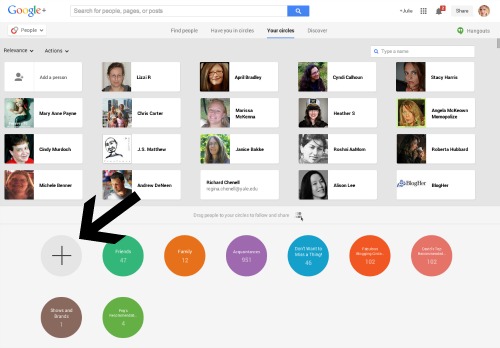
circles
If you click on a circle, you’ll see you can edit the name of it, trash it, or share it publicly.
When you are sharing things on G+, you can specify which circle to share it with. You can choose public (which means the whole world can see it) or pick the circle that would be most interested in what you have to say. ***NOTE*** You should always share things publicly, unless you are sure the circle of people you are notifying are interested. Nobody likes to get emails or notifications when your post isn’t directly related to them in some way.
A word about CircleShares. These are networking parties on G+ and
I’ve written an entirely separate post on how they work. It’s HERE!
 
Now let’s move onto your profile.

Profiles

The profile in G+ works a lot like Facebook. You have a cover photo, a profile photo, and then a bunch of tabs where you can find your photos, YouTube videos, things you’ve liked, etc.
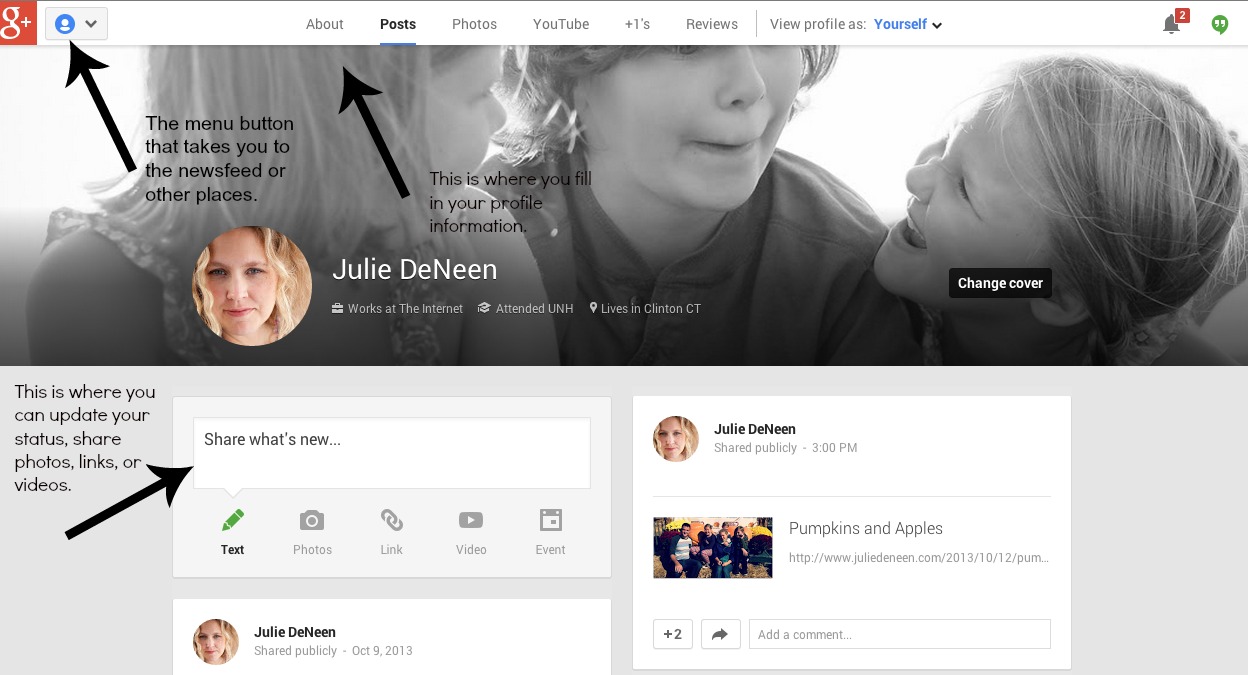
profile
One of the nice features of G+ is that your photos are automatically connected to a Picasa account (if you have one- it was phased out and now resides on Google). Also, if you have a YouTube account, those will appear as well. On the right hand side, you’ll see all your friends, plus the people who’ve added you into their circles.
  1. To edit your profile, go to the About Tab.
  2. You’ll see boxes of various categories. Each box has an “Edit” button. Go ahead and beef up your profile! It’s one of the most important things you can do on Google +.
  3. Make sure your tagline is catchy. That is what people see when they hover over your name all around Google.
  4. Write a bio and include relevant links. You can hyperlink content in your bio!
Google Authorship
When you are searching for something online, do you ever see a person’s profile shot in the google search results?
Do you notice how my headshot shows up under my website and the others do not? This is a great way to increase your visibility in search results and is done by editing your profile. It’s called Google Authorship.
Scroll down until you find the box that says Links. Here is where you want to add and connect all your profiles, websites, and blogs so that your photo shows up in search results. Click the edit button and enter all the information in. There are also WordPress plugins that allow you to verify your authorship. Search in the plugin directory of your site for help.
Once you’ve added your links on Google plus, you should go into your WordPress dashboard and add your Google plus profile in the user area. Within a few weeks, Google should begin showing your photo in search results.

Can you Like stuff in G+ ? The +1 !

On G+, you +1 things that you like. It’s your way of saying you would recommend an article or status update. The +1′s are everywhere, just like the “like” button on Facebook. Have fun with it, and when you want to see all the things you’ve liked, go to your profile and look under the +1′s tab. You’ll see it all listed. Neat huh?
If you want to see who has plus oned a post you wrote, simply find the post and click on the little area on the top righthand corner of the box (it’ll only appear when you hover). Click on VIEW POST ACTIVITY. You’ll see everyone who has interacted and you can click on their name and thank them!

Posting on G+

Let’s post something. Go to your profile button or your home button. Either one is fine.
You type in what you’d like to say. If you have a link, just paste it in there and it’ll pull up a preview. You can scroll through the images (with the little arrows), just like in Facebook. You can also tag people. Where it says + Add names, circles, or email addresses, keep it public. Note that if you tag someone in your update, it’ll add their name after the public. That is okay (and the way to tag is by adding the + sign and their name).
If you want to post in a community, you can’t post publicly (which is fine). It’s up to you to decide which content should be shared in a community and what should be public.
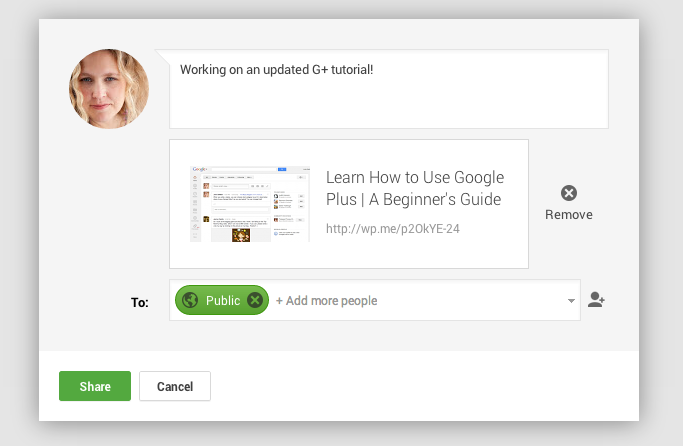
posting an update on G+
What about the SEND EMAIL checkbox? That means your post will go anyone who’s been tagged. Use judiciously and only if you are sure they would want to see it in their inbox.
Hashtags
Similar to Twitter, you can use a hashtag in your status to help people find your post.
How to Craft a Great Google Plus Post!

Understanding the differences between posting on Google plus and posting on Facebook

Every single post on G+ is in essence its own webpage. That means it has a URL attached to it for easy sharing. This being the case, a lot of people blog right into the Google plus status bar. It is common to have links, hashtags, photos, and text all in that box. It’s a major difference from Twitter (the micro-blog) and Facebook– both which favor shorter updates. If you want to learn how to post on G+, here’s a recipe for the perfect G+ post.
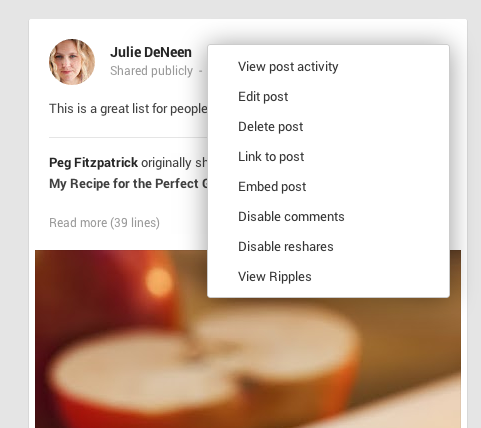
See how you can edit posts after the fact? You can also link to them and embed them into your blog.
What’s the View Ripples option? That allows you to see how many times it has been shared and by whom. Then you can hover over their names and visit the post and thank them.

Notifications

Your notifications will be in the top right hand corner next to your profile image. That’s also where you can adjust your settings and email notifications.
You can respond, mute, and reply right from the notification box. This box will also be available in your gmail account and when you are on the Google search bar! It appears on the Google bar and on YouTube as well. Everything you need to do can be done in that neat little box. Multitasking at its finest!
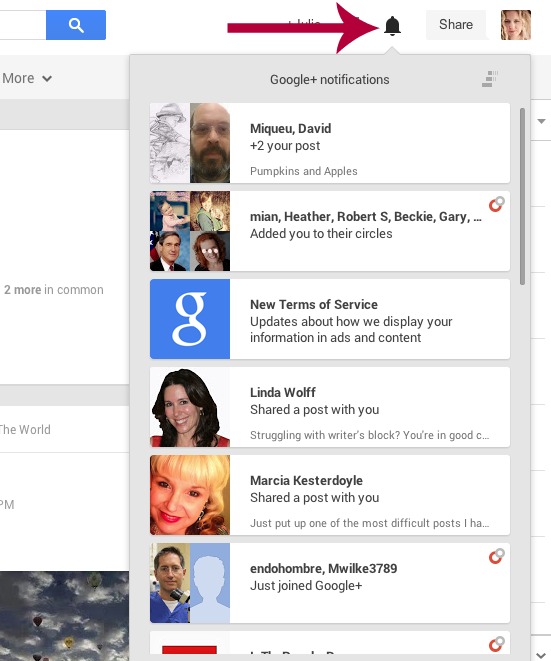
notifications

Pages

Just like Facebook, you can create a page for your blog. Go ahead and hit CREATE NEW PAGE. When you want to post as that page, go to the top right where your profile shot is, and switch to your page. You can do  many of the same things with your page as you can with your profile. People can’t +1 a profile, but they can +1 a page. It doesn’t mean they are following you though. They must add you to a circle in order to see your updates!
I will be compiling some more posts about Google plus pages and adding them here so check back!

Communities

Communities function similarly to Facebook groups. You can join the open ones or request invites into the closed ones. You’ll notice in a group that there are categories for different types of posts. This feature isn’t available on Facebook and works great if the feed is super busy.
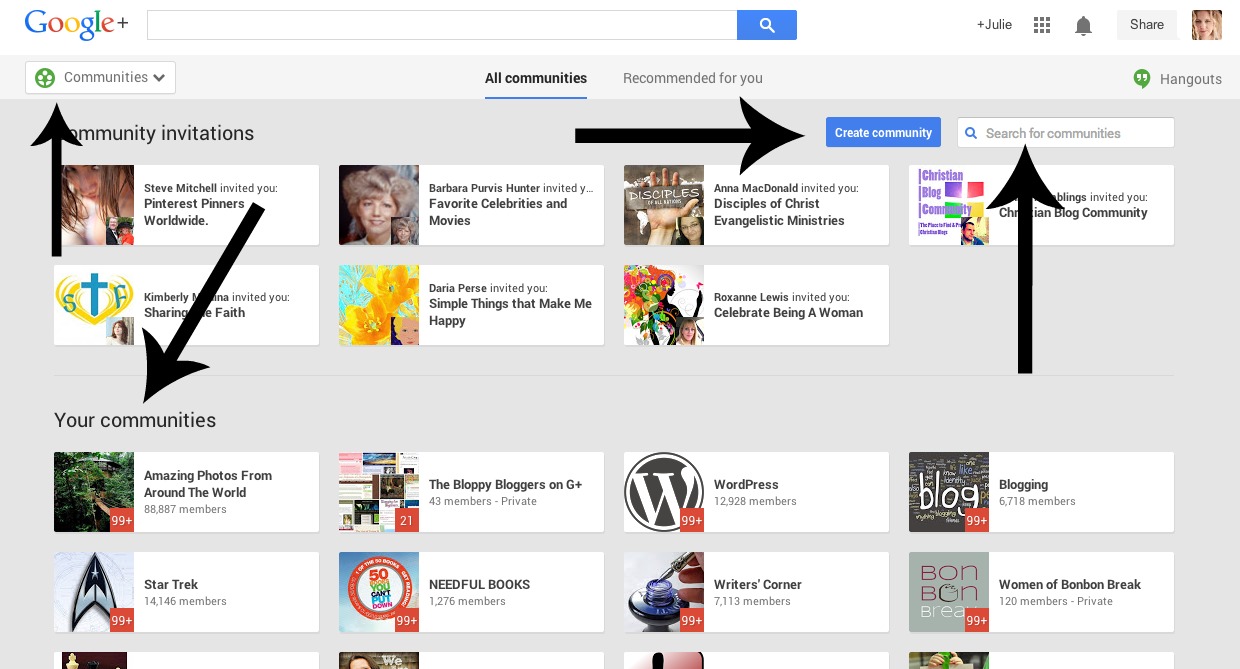
communities
Notice the little red numbers? That tells me how many unread posts I have in each group I belong to. Scroll down further and you can explore groups to join.
Communities are great to use because it helps you find a targeted audience and connects you to new people. If you decide to start a community, share your posts in the community first, and then share them out to your profile. It’ll give your community a bit more exposure.

Google Hangouts

In addition to chatting and posting, you also have the option to start a hangout. A hangout is just like Skype, but you can have up to nine people talking at once. Hangouts have all sorts of neat features like automated event notifications to people with Google calendars, the video gets published to YouTube so people can watch it later, etc. There’s a lot to know about hangouts that won’t be covered here. A good place to start is the Hangout Helper.

Advantages of Google +

A lot of people haven’t joined G+ because Facebook is so similar, why have two platforms? Well, G+ is quickly showing its superior skills with the following advantages:
1. Full integration with Gmail, YouTube, and Picasa.
2. Photos display MUCH more beautifully and work wonderfully with Pinterest. See attached video!
3. Regular engagement on G+ helps with your Google ranking for websites and pages.
4. Video hangouts (which Facebook does not offer).
5. Open platform with less rules and restrictions.
6. Allows people to categorize friends more easily.
6. Whereas Facebook is meant for connecting with friends and Twitter is about following people that interest you, Google + has combined the best of both worlds.
7. The events feature has invites, party mode, and other options that Facebook does not.
8. Once you get used to the navigation, the hover menu options makes G+ easier to use than Facebook.
9. No paying to promote posts!
10. If you host your blog on Blogspot, you have even more integration options. Go to your dashboard and click G+ to see the features available to you!
11. Each post is its own webpage and makes it easier to share across the web.
12. The ripples effect shows you how far your posts travel and who is sharing you.
13. Instant upload with photos on your smartphone right onto Google.

Common Questions

What does it mean when it says someone added me into their circle?

This means that they will now see your posts.

What does it mean when I add someone to my circle?

It means you will now see their posts.
The circles act more like Twitter than Facebook. With Facebook, it’s a mutual agreement to be friends. With Twitter, you follow and hope someone follows back. That is the G+ way.

What’s the point of the different categories of circles?

It helps you to share relevant info with the right people. It also helps organize your own newsfeed. You can set it so you only see news updates from certain circles if you wish. It is like the “list” function in twitter.

Can I add people to a circle that follows my page?

No. Pages are like Facebook. Just like you can’t force likes, you can’t force people to follow a page. If they are interested, they can hit follow. If they do that, it means that your page posts will show up in their newsfeed. You can add people into your circle, acting as your page, but that means you will see their posts in your newsfeed…when you are acting as your page. Make sense?

I don’t get the notifications box.

The notifications box allows you to quickly interact on G+ . It takes a bit of getting used to, but new notifications are white and already read ones will turn gray. When you see a notification, click the arrow to the right of it. When you do that, you’ll see the post, the comments, and you can reply right then and there, without having to scroll through the feed to find it. Imagine if every time you got a notification on Facebook, you could reply right from the notification box without having to go to it? That’s what G+ does. And, when you hover of the comment – the +1 will appear and you can click it.

How do I turn off all the email notifications in my inbox?

Click on your profile shot in the upper right hand corner and then choose Account. On the left hand side, click on G+. All the email notification settings are right there.

I get other stuff in my newsfeed that I didn’t specify?

How do I change that? For example, click on Explore on the left hand side. You’ll see posts from select people and pages that G+ has pulled up for you. Look at the top right and you’ll see a bar (like a sliding scale). You can move that bar so more or less of these types of posts show up.

How do I easily get my photos onto G+?

If you have an iphone or Android with a camera, download the G+ app and use instant upload. Everytime you take a picture, it will automatically upload to your photo albums on G+. Any current photos can be shared (or not) by hitting the “share settings” red button up at the top.

Verify your blog on your Google profile

If you’d like to have more visibility with you G+ page and your blog, verify your website. In order to do that, you need to do the following. (This is different than authorship which I talked about above).
1. Make sure you have a plugin like Metadata or Yoast installed (these instructions are for self-hosted WordPress).
2. Then go to your page that you’ve created.
3. Click on About.
4. Where it says Website, add your website URL. Then click Link this website.
5. It will pull up a code. You need to put that code in your metadata plugin. It belongs in the box that says Site-wide Metatags. You can also put it directly into the header of your blog (in the html).
With new WordPress updates, there is now a Google + field in the user area that can be used to link your blog to your G+ account. Go under Users to find it.
Help me Get Google Plus! If you are intimidated or overwhelmed, this video will get you started.

I hope you’ll give it a whirl!
http://www.fabulousblogging.com/2013/03/learn-how-to-use-google-plus-a-beginners-guide/


Posted by Unknown at 06:28 No comments:
Email ThisBlogThis!Share to XShare to FacebookShare to Pinterest
Labels: beginners guide to google plus, how to use google plus

New Rules To Change The Way You Use LinkedIn

 
No matter how long you have been in business, or how long you have been making use of the LinkedIn platform, it is likely that you are not using it to its fullest potential. If you have been disappointed by your results in the past, here are some rules to help you change the way you think about this social networking platform. Let’s take a look at them:
LinkedIn Is Not Just A Platform For Recruiters And Job SeekersiStock_000035135258_Large
Sure, there are a lot of recruiters making use of LinkedIn to tap into its available talent pool, but there are also plenty of professionals and companies getting great results from it. No matter how long you have been in the job market, an updated LinkedIn profile is the ultimate professional “accessory”.
In order for it to work its magic, you need to keep an updated profile at all times, even when you are not looking for a job. What’s more, you also need to show that you are an active member of the professional community so it is a good idea to start following influencers and becoming active in groups and discussions if you have not done so already. Entrepreneur.com advises that the following basics be covered:
Be sure to put the most critical details about yourself or your business on top, so people won’t miss them. Explain exactly what your company is, who your clients are and how you help them. Also showcase your products by filling out the “Products and Services” section of your company page.
It is only when you are ready and prepared that opportunities will begin to present themselves. You never know what someone out there might be searching for. If you are ready, it could be your profile that comes up.
You Do Not Have To Let Everyone In Your Network Know When You Update Your Profile
If you do want to keep a low profile then you will be pleased to know that you can control your privacy settings and modify whoever is notified of your profile changes and updates. Hubspot explains how you can utilize this feature:
When you go into “edit” mode on your profile, there is an option on the right side in the middle of the page that asks if you want your network notified of profile edits. Just turn this on/off as you see fit.
Of course, if you allow everyone to see the updates it does keep you in the line of sight; a tactic you may want to employ if you are looking for a new job.
You Can Use LinkedIn To Make New Connections
Sure, the platform does encourage you to connect with people you know or have worked with in the past, but you can also use it to connect with new prospects and professionals you have never met before. LinkedIn tells us that the most effective connections you can make are those where you have something of a history but you can still use it for making new contacts if you use the right etiquette.
If you want to connect with someone you do not know well, or have never met, it is important to introduce yourself politely and be transparent about the reasons for wanting to connect. Tell the person why you would like to connect with them.
The Objective Is Not Just To Acquire As Many Contacts As Possible
Of course, there are advantages to having lots of contacts on LinkedIn, most notably the fact that your network expands and your number of opportunities. But, there is no secret club that is reserved for people who can generate hundreds of connections. And, it is not necessarily who you know, but what you do with those connections that can see you succeed or fail on the platform.
Once you are making connections it is equally important to nurture them and to maintain your relationships. If you do not talk to your audience regularly, you will fall out of contact, and building them up again can be just as much hard work as harvesting cold leads. This Social Media Examiner article explains this sentiment further:
When you do the work of influence networking, your connections will be much more receptive to the content that you do share on LinkedIn. Instead of marketing at your LinkedIn network, nurture your connection with your network members, which will also potentially foster an actual client or referral-based relationship.
You Can Accept Invitations From People You Do Not Know
In much the same way that you can start connecting with people whom you don’t know (but have a good reason to do so), others can send you invitations, and it is not necessarily an open invitation to get lots of spam. If you are on the receiving end of something abusive, or if you are unsure about the authenticity of an invite, you can always report it to LinkedIn.
You Can Use LinkedIn To Post About Topics Beyond Your Own Industry
If you run your own business or want to drive traffic to your website or business page it is useful to tie your content in with industry news. But you can also use the LinkedIn platform to talk about other issues that you have an interest in. If you want to build your online reputation you can show your audience how diverse your interests are – and just how interesting that makes you. Follow and post your opinion about major current events and affairs. If necessary you can also tie in these stories with your own industry news.
You should be careful as you do not want to spam people, but if you constantly seek out original, fresh content and you have a receptive network, your activities can see you go far and develop a decent professional following that you can take with you, now matter which direction your professional career might go.
http://imsoup.com/12121/new-rules-to-change-the-way-you-use-linkedin/
Posted by Unknown at 06:12 No comments:
Email ThisBlogThis!Share to XShare to FacebookShare to Pinterest
Labels: how to use LinkedIn

How Site Links Can Boost Your Website’s SEO

               
If you are making use of Google’s site links you are probably already on your way to dominating the search results for your niche. If you are not, then you should be pleased to know that if you do, you can actually increase online trust for your website and send more targeted traffic to your site. So how do you get them and what do you do with them? Let’s take a look.
What Are Site Links?
Site links are a format for listing in SERPs. They show your website’s main page and some of the other internal links that have been targeted. They are organized into two columns in the SERPs.
Generally speaking, these only show up for navigational or branded search queries. So when a user types such a query in, they are shown the main page as well as some internal pages of the site, to offer quick access for where the user may want to go.
What Makes Site Links So Important?iStock_000016999835_Large
Well if you have not guessed it already these site links are really important because they enable a user to navigate to and around your site quickly and easily. They allow a person to find what they need with minimal effort. From your point of view, they can also get a visitor to the most relevant content in the fastest time possible. According to Google:
We only show site links for results when we think they’ll be useful to the user. If the structure of your site doesn’t allow our algorithms to find good site links, or we don’t think that the site links for your site are relevant for the user’s query, we won’t show them.
So What Is The Bad News?
Well actually, site links cannot be created, they are auto generated by Google. You cannot choose which links appear and when they show up. The only thing you can do is to let Google know when an unnecessary link is included that does not need to be there.
And The Good News?
The good news is that having site links makes pages other than the home page busy and active. And while there is a chance that the bounce rate may go up, there are also other benefits, as explained here by Moz.com:
Arguably, the bounce rate on pages appearing in site links will increase but at the same time site links should drive higher quality traffic, potentially increasing user engagement and conversion as more users will be able to quickly land on the pages they desire.
Better news is that, while you may not be able to demand site links for your website, your chances of being given them increase if you employ best practice guidelines while you are building your website. Okay so Google does not publish a guideline on how to create them, but if you do follow and adhere to the rules, your chances of acquiring them will increase.
One way to improve your chances of getting site links is to get a strong brand or company name, which is easily distinguishable from keywords for your website. You need to rank quite well for navigational search in order to do this.
Another way to improve the chances of getting site links is to ensure your website has a clear and solid site map. Your navigation should be intuitive and easy to use. It should follow a navigational sequence and include the basic elements: home, about, contact, blog and news.
You should also have an XML site map for your website. This makes it easier for the search engines to crawl and, you guessed it, easier for them to allocate site links too.
 
http://imsoup.com/12095/how-site-links-can-boost-your-websites-seo/
Posted by Unknown at 06:09 No comments:
Email ThisBlogThis!Share to XShare to FacebookShare to Pinterest
Labels: boost website seo, search engine optimisation

Affiliate Marketing For Dummies [IN PLAIN ENGLISH!]


Posted by Unknown at 03:15 No comments:
Email ThisBlogThis!Share to XShare to FacebookShare to Pinterest
Labels: affiliate marketing for beginners, affiliate marketing for dummies

The Guide To Social Media Time Management

 
theGuide to SocMed TimeDo you struggle with social media time management?
Are you spending more time than necessary and not getting the results you want?
Most people tend to waste a lot of time on social media because the process they have to complete those tasks takes much more time than necessary. Even worse, I find they spend a lot of time on tasks that create little long-term value while missing out on the most important high leveraging tasks.
I considered writing this article in a way that would set specific times for specific tasks but I quickly realized that wasn’t going to make sense for everybody. Instead, I tried to uncover some of the major reasons why inefficiency in social media occurs, how to identify where you could be wasting time and some simple guidelines that will help you make the right decisions to become highly productive.

Top 5 Reasons You Are Wasting Time on Social Media

  1. Spending time on tasks that don’t produce results. It’s so easy to waste hours a day just looking at your Facebook insights or seeing how many shares you got on your last post. You can’t question the efficacy of your social efforts if you aren’t spending most of your time reaching out to new people and building relationships with targeted prospects.
  2. You’re missing the foundational elements that give you credibility and establish trust. If you don’t have an optimized LinkedIn profile (or any other social network you are using) that speaks to your ideal client, they aren’t going to be interested in your attempts to connect.
  3. You’re reactive, not proactive. Nothing truly exciting will come along when you’re in autopilot. Always be ready to hustle and put time into tasks that putting you closer to developing real relationships with prospects and strategic alliances.
  4. You think you’re a big deal (but you’re not). It’s unfortunate when business owners get complacent in their social media efforts because they are proud of themselves for hitting 500 followers on Instagram. There is no destination in marketing because the target is always moving. Never be satisfied with your results and constantly strive to find the next big challenge as you hit milestones.
  5. You don’t realize you’re a big deal (and you’re dropping the ball). There are some big companies out there that are completely dropping the ball with social media because they are more concerned with pushing advertising then adapting to the medium.
I won’t mention names but I’ve spoken with a couple Fortune 500 companies that had no idea their brand and products were being mentioned hundreds of times per day. This was just after listening to them complain about not being able to easily find their customers. The game is different for the big guys and little guys in social media – you have to know your place, find your angle and act appropriately.
It’s all a waste of time if you haven’t built your foundation with optimized profiles and content that speaks to your ideal client.

The Major Difference For Small Vs. Large Followings

If you have an active and large following, the most important things for you will be responding to direct and indirect mentions of your business, wall posts, comments and putting out quality content on your blog and social media channels.
If you have a small or non-existent following, the most important thing is creating incredible content that will blow your audience away and then properly promoting that content. Connecting to individual people and building relationships from the ground up is crucial at this stage. Depending upon the platforms you choose to use you may also have to budget for some ads to build a targeted audience.

The 5 Levels of Content Creation

Everyone talks a lot about content creation but for the purposes of discussing time management, it’s important to distinguish the different levels of content creation.
  • Level 1: Social media posts (Facebook status update, Tweets, etc.)
  • Level 2: Blog posts, articles
  • Level 3: Downloadable reports, checklists, short eBook (under 30 pages)
  • Level 4: Webinars, teleseminars, video training course
  • Level 5: Full length eBook and physical book
As you can see, not all content is created equal and can range drastically on the scale of how much time it will consume. When you’re running short on time, you should still be covering Level 1-2 of content creation as they keep your social media machine running. When time permits, you should strive to incorporate Level 3-4, at the very least executing these levels once per quarter.
Level 5 is an area that not many people will ever go to in their lives but it can be the critical differentiator you need to get to the next level in your industry. I can personally attest that writing my book The LinkedIn Code has been the most powerful credibility booster for my business.

Social Media Time Management: Prioritizing Tasks

There is a certain bare minimum that you need to be prepared to dedicate to your social media presence to keep it alive otherwise every minute becomes a waste of time and will not produce results.
1. Maintain a weekly blog (non-negotiable)
Content is the foundation to a good social media campaign. I recommend publishing at least one high quality article that educates your target market each week. If you stop putting out new content, your website traffic will begin to drop and you’ll start to see the negative effects stem out to all other social channels very quickly. A great blog is enough to keep people coming back and allows them to get to know, like and trust you as an authority on your topic.
2. If you have a decent following, ensure you are addressing mentions and comments in a timely fashion
Once you’ve grown a sizeable following, the bulk of your time will be focused on engaging them and making sure they are getting responses. I get over 100 mentions and retweets on Twitter alone each day. Keeping up can be a little crazy but even when I’m short on time, I make this a priority because it’s the community that keeps my entire presence afloat.
3. If you don’t have a decent following, ensure you make engaging new, targeted social media users a priority
It’s okay if you don’t have a decent following at this exact moment. You’re going to be spending your time on other things to help change that and you’ll learn some extremely valuable skills about engaging people one-on-one in the process.
4. Create a social media tasklist
I created a task list of over 25 social media tasks the pros never forget in a simple graphic (pictured below). It only covers Facebook, LinkedIn and Twitter but it’s a tool I consistently reference this list when working with clients. My team at Top Dog Social Media uses a version of this list to stay on track with our presence and managing our clients social media campaigns.Social media tasks outlined in checklist

Productivity Hacks, Tips & Tricks

There are some other schools of thought around productivity management and you’ll likely have to experiment to find one that works for you. Aside from the general tips for being more productive (eat healthy, exercise, meditate, etc.), here are a few practical “hacks” to consider incorporating.
Refine Your Processes. Constantly be aware of simple ways to make your social processes more efficient. When I first started using Buffer, I saved a ton of time curating tweets and never forgot to share a great article I read since Buffer made it so easy to create the tweet and throw it next in line on my publishing schedule.
Buffer actually introduced a new feature called Feeds that makes it even easier to create tweets from your favorite blogs and websites by syncing their RSS feeds right inside the app. Little tweaks like this can save a massive amount of time over months and years. I swear Buffer did not pay me to say any of this, I have no affiliation with them other that it is one of my favorite time saving tools!
Egg Timer. I’m not talking about the timer app on your iPhone or a widget on your desktop. I’m talking about a classic egg timer that exists in physical reality and social media superstar Chris Brogan is one of many that swear by its effectiveness. Use one to stay focused on the tasks that must be done first before engaging in any other activities.
Manage Your Mobile, Don’t Let It Manage You. This is actually a Richard Branson quote but it hits home to all of us that are fiercely addicted smartphone users. Use your phone to make you more productive without treading into that black hole of time wasting. The force is great but you can escape it with strength, Jedi.
Create “Deadline Challenges”. Even if you don’t have a deadline for something, challenge yourself by limiting the amount of time you have for a specific task. Whether it’s spending 10 minutes connecting with at least 10 people on LinkedIn or 5 minutes to answer all your @mentions on Twitter, the more time you leave yourself to accomplish things, the more time it will take you.
Pomodoro Technique. A time management technique developed by Francesco Cirilo in the 80’s. The concept relies on 25-minute intervals of work separated by short breaks. The method is based on the idea that frequent breaks can improve mental agility and encourage you to get more done in less time. Learn more about the Pomodoro Technique
http://topdogsocialmedia.com/social-media-time-management/
 
Posted by Unknown at 03:09 No comments:
Email ThisBlogThis!Share to XShare to FacebookShare to Pinterest
Labels: getting things done on social media, social media time management

The Social Media Landing Page – The Underutilized Page You’ll Kick Yourself For Not Having


The Social Media Landing Page – The Underutilized Page You’ll Kick Yourself For Not Having
 
I’m going to take a huge leap of faith here and suggest that people who click your bio link from social media platforms are more valuable than your average visitor.
Crazy notion right?
I like something you say in the busiest information exchange known to man & decide to investigate and learn more about you and you have to offer.
So please, please tell me, why aren’t most of us send these genuinely curious visitors to where traffic goes to die – the homepage?

It seems to me these visitors specifically should have the red carpet rolled out, and treated with the utmost care on a social media landing page.
Because you know, clicking the bio link is not something people just do every day.

A Personal Introduction to Your Website

At the core of your “social media landing page” page is a serious consideration of why your visitor comes to this page in the first place.
Perhaps, “rolling out the red carpet” is an exaggeration. But when you take into account that a bio link is typically 2-3 clicks away from the normal feed & the visit is typically triggered by you sharing something truly thought provoking or of genuine interest (not some overhyped click-bait link), it makes sense you should be putting your best foot forward.
Imagine the “bio clicker” is a big ticket lead who’s flown in to visit your office for the first time. Etiquette dictates you’ll give them a tour of the building and an overview of the services most relevant to their needs.
That feeling – the introduction of a brand that can be trusted and is worth the visit – that’s what should be at the soul of your “social media landing page” page.
You don’t want to give away too much and cause overwhelm, rather just enough to get people excited to learn more about what you’re doing.
It’s all about the scent of information as they call it in User Experience, and it’s about delivering information that syncs up with their intent as much as possible.

Provide Relevant Archive Content That Matches Tone of Referring Site

Matching that scent isn’t as hard as it sounds.
If you take a second to think about it, it’s safe to assume different social media sites refer different kinds of traffic.
Facebook & Google+, by nature of their design, are more likely to generate discussion driven content, (See Dan Zarella’s Science Of Facebook) so the content on your “Coming From Facebook/Google+” pages could be focused on starting conversations or sparking debate.
Traffic coming from Facebook
Twitter might be a better match for more “sharable” content with attention grabbing headlines and well designed images. Looking at the top articles here on Social Mouths, the most frequently shared articles on Twitter usually contain infographics or colored graphs w/ easy to digest analysis.
Linkedin is an obvious match for lead generation style content. Whitepapers, .Pdfs,  Slideshare presentations are a natural choice for the LinkedIn landing page. Given the nature of the traffic, it would also be perfectly acceptable to include a email form, or even better call tracking service (detailed below) on this social landing page. Testimonials should also be strongly featured on the “Coming From Linkedin Page”
Traffic coming from LinkedIn
(not an actual SocialMouths page)
Pinterest users might be interested in visual content.
Instagram, more personal, photo driven content and so on and so on.
Of course, this is a general analysis. However, the importance of analyzing your visitors from different traffic sources can’t be stressed enough.
You’re not just creating a better experience for your curious byline visitor, but you’re maximizing your overall content efforts to extend the shelf life of older articles beyond the hyperactive social media lifecycle.
Beyond that, if you’re tracking which content gets the most clicks from these pages, you’ll receive very valuable data on what style content works best on the different social media channels in the future.

A Smarter Way To Capture & Send Emails

As a general rule, you should do your best to include an optin form to a relevant email autoresponder on your social media pages.
If you’re an Aweber user like me, I’d recommend using a service like AWProtools to send extremely relevant emails well after your visitor consumes the ethical bribe (like the Facebook Tabs Mini Course). In a lot of ways, my emails act like a “choose your own adventure” novel, where the subscriber strongly influences what ends up in their inbox.
For example, once the Facebook mini course is over, I send an email that provides a handful of options asking what they’d like to learn about next, like Facebook Marketing, Twitter Marketing, Linkedin Marketing.
If they click on the Twitter link, they’ll automatically be switched to a “Twitter Marketing” autoresponder designed to inform & tune the lead into the “Twitter Marketing” problem. Eventually the autoresponder  promotes a service designed to solve that problem, while meanwhile anyone who clicked on Facebook or Linkedin from that same email is undergoing a similar process to solve a problem more relevant to their needs.
Email Marketing Map
(another example of the email forking strategy: image credit)
This “Email Forking” strategy allows you to reduce irrelevance in your emails over time, resulting in higher open rates, click throughs and ultimately sales. Another thing about AWProtools I like, is that if they don’t click on anything by the time they reach the end of the first autoresponder, they’ll automatically move to my “broadcast only” list, so they don’t just get lost forever.

Always Provide Contact Information

However, understanding that a large percentage of your visitors may not be interested in parting with their email address, including your phone number on the “Coming From Social Media” page is a way to capture additional leads and deliver an even better user experience.
BUT WAIT?! If someone calls in, won’t you lose all that juicy analytics data? Nope.
Call marketing tools  like RingRevenue.com allow you to generate unique phone numbers for every visitor that come to your site. Once they call in, their online analytics data will be tied to their phone number, and the call data, including details such as referring keyword, social media landing page, and other caller demographics can be integrated into contact management services like Salesforce.com.
Knowing what pages your inbound call leads are visiting will become extremely useful to your overall content strategy, as you’ll be able to create content and update key pages to include frequently asked phone questions, future blog posts, and future email marketing efforts.
Ring Revenue
Call tracking of course doesn’t have to be limited to the “Coming From Social Media” page, and can be integrated throughout your entire site, however the ability to segment out social media phone leads vs. all others will help you to better track the effectiveness of your social media efforts. (e.g. Higher call volume after participating in a # chat on Twitter, or tracking the effectiveness of a video campaign.)

Share a Calendar of Upcoming Events

Doing a book signing? Speaking in a new city or at a big conference? Hosting a virtual event?
If someone’s taken the time to click through your social media profile, why not give them a quick run down of where they can get more of you in the very near future?
That bio link click is a very powerful indicator they’re interested in what you’re doing, so tastefully give them a way to get more.
Event Calendar
Bonus points: Use a behavioral targeting area through a service like Visual Website Optimizer to show only local events to people within that specific geographic region.
Extra Credit: If you’re one of those people with an exceptionally hectic schedule, you may also consider embedding a calendar widget in this area for a visitor to book a time. This way you can capture emails, phone numbers, and a commitment to talk.

Finally, You’re Dealing With A Different Kind of Conversion

In doing research for this article, I realized that the social media landing page isn’t anything new. But I am genuinely surprised I don’t see more of it.
Search Engine Land wrote an article about this strategy back in 2010 called “The Anatomy Of A Great Social Media Landing Page.” The article stresses the point that social media landing page conversion isn’t about capturing leads so much as it is about converting visitors to various kinds of brand ambassadors.
While it’s talking about using social pages for customers, I’d like to adapt two of it’s main social landing page conversions to make our bio link clicker feel more at home:

Conversion to User

This kind of conversion is probably the easiest to grasp, as it is conversion in the traditional sense.
However, instead of going straight for the “Sign up for free trial” straight away – use prepackaged videos, eBooks, or some other educational component which can be “bought with a tweet” or share.
Even if your curious bio visitor doesn’t become a customer, they end up sharing your content & generating social proof in the process, which according to Hubspot, makes prospects 71% more likely to buy.

Conversion to Opinion Holder

The strongest things you can do in marketing is develop messaging that simultaneously attracts the right people to you while repelling the wrong people away.
With this kind of conversion, you’d be looking to include tweets, testimonials & comments along with strong opinion/ethos based content to show visitors they belong (or don’t)
An example of this might be featuring articles like “4 Marketing Methods More Powerful Than Advertising” or “Why The How To Article Is Dead” with very visible share numbers as well as comments or tweets that support the overall philosophy.
(not an actual Social Mouths page)
The idea is to curate very specific content on this page to create a vibe that lets your visitor feel “at home” and with a tribe that supports their point of view.
For some, this might provide the exact opposite vibe, but if we’re being realistic, those probably aren’t the people clicking on your bio links either.

Just Remember, The Bio Link Means Something

To reiterate what I’ve been saying all along, when someone clicks on your bio link, it really means something.
Entertain the possibility they’re addicted to your words like meth addicts – and social media just ain’t scratching that itch anymore.
Use this page to cultivate a sense of belonging, and use what you know about the referring social network to send people down a rabbit hole to get them bonded to your content.
http://socialmouths.com/blog/2013/07/30/the-social-media-landing-page/
Posted by Unknown at 02:57 No comments:
Email ThisBlogThis!Share to XShare to FacebookShare to Pinterest
Labels: social media landing pages

5 Facebook Fan Page Problems and How to Fix Them


Facebook Fan Page Tips
 
Twitter, Google Plus and Facebook are probably the top three social media sites that every blogger should be on right now.
And even though the first two have millions of users under their belt and are great lead generation tools, there really is no other network as powerful as Facebook.
Just try to think who of your friends doesn’t have a Facebook account!

That is the reason why every business and every blog should have a Facebook fan page. If you haven’t yet created one for your blog, you are missing out on a huge potential audience, high engagement levels and targeted traffic.
But even if you have one, there are no guarantees. The fact is most fan pages will remain unnoticed and won’t ever break the hundred likes barrier.
Getting people to click that elusive “Like” button isn’t as easy as it sounds. And even if you have the fans, generating likes, comments and ultimately Facebook traffic has its pitfalls.
The following post is all about those pitfalls.
In the below paragraphs you will find five of the biggest reasons why people might decide your Facebook page isn’t worth a visit and of course tips to help you fix the problem areas!
Let’s get started:
Read more »
Posted by Unknown at 02:53 No comments:
Email ThisBlogThis!Share to XShare to FacebookShare to Pinterest
Labels: facebook fan engagement, what to post on facebook
Newer Posts Older Posts Home
Subscribe to: Posts (Atom)

Internet millionaire wants to work FOR YOU

Posts

Atom
Posts
All Comments
Atom
All Comments

Blog Archive

  • ▼  2014 (567)
    • ▼  December (18)
      • 5 Killer Strategies to Help Your Business Dominat...
      • 6 Great Examples of Facebook Quiz Marketing   ...
      • Twitter Psychology: 7 Tips to Grow Followers and U...
      • Benefits of Article Syndication (And How to Do it...
      • Simple Ingredients For A Successful Blog Post Po...
      • PR/Business blog 29 Free Ways to Promote Your...
      • Paid Traffic: 20 Methods That Create Fast Results...
      • <!-- .header --> 3 Power Words for More Pe...
      • How to Get 247% More People to Read Your Content ...
      • Go from Zero to SEO Ninja Hero with These Tactics...
      • What To Do After You Have Written Your Blog Post...
      • Do you know exactly where you are getting your c...
      • 25 LinkedIn Facts and Statistics You Need to Sha...
      • The Four Vital Skills    0  
      •   <!-- #masthead --> How to Get Your First ...
      • How To Write Blog Posts Your Readers Will Love ...
      • 10 most clichéd hashtags you're still overusing ...
      • SEO trends for 2015: What’s coming next (plus: sc...
    • ►  November (104)
    • ►  October (172)
    • ►  September (171)
    • ►  August (102)

SUCCESS BLUEPRINT

YOUR ULTIMATE GUIDE TO SUCCESS - ENTER YOUR DETAILS IN BOX ABOVE FOR FREE BLUEPRINT

YOUR ULTIMATE GUIDE TO SUCCESS - ENTER YOUR  DETAILS IN BOX ABOVE FOR FREE BLUEPRINT

BLOGGING SUCCESS

Blogging With John Chow

AFFILORAMA

VIDEO TRAFFIC

Google+

PROVEN ONLINE BLUEPRINT

PROVEN ONLINE BLUEPRINT

About Me

Unknown
View my complete profile
Tweets by @JOHNODWYER67

Translate

Total Pageviews

INSPIRING QUOTES


Famous Quotes by QuotesDaddy
Awesome Inc. theme. Powered by Blogger.